The 10-second answer: open your phone’s dialer and type *#06#. If a long EID number appears alongside your IMEI, your phone has eSIM hardware and can use an eSIM. No EID generally means your phone does not support eSIM. This is a useful first check, but device and regional compatibility can vary.
That code is a useful check, and it’s worth trusting alongside your phone’s settings and the manufacturer’s compatibility information. Device lists go stale the moment a new phone ships, and the same model can behave differently depending on where it was sold. Below you’ll find the current lineup by brand anyway, plus the two things that quietly stop a “compatible” phone from working being locked, or a regional variant and what to do if your model isn’t listed. You can also run Airhub’s eSIM compatibility checker to confirm your exact device in a couple of taps.
How to check if your phone supports eSIM
There’s no single “right” way to check here are four, fastest first:
- Dial *#06# (works on many phones). Type it into your dialer it may trigger automatically. If you see an EID (a 32-digit number) next to your IMEI, your phone supports eSIM.
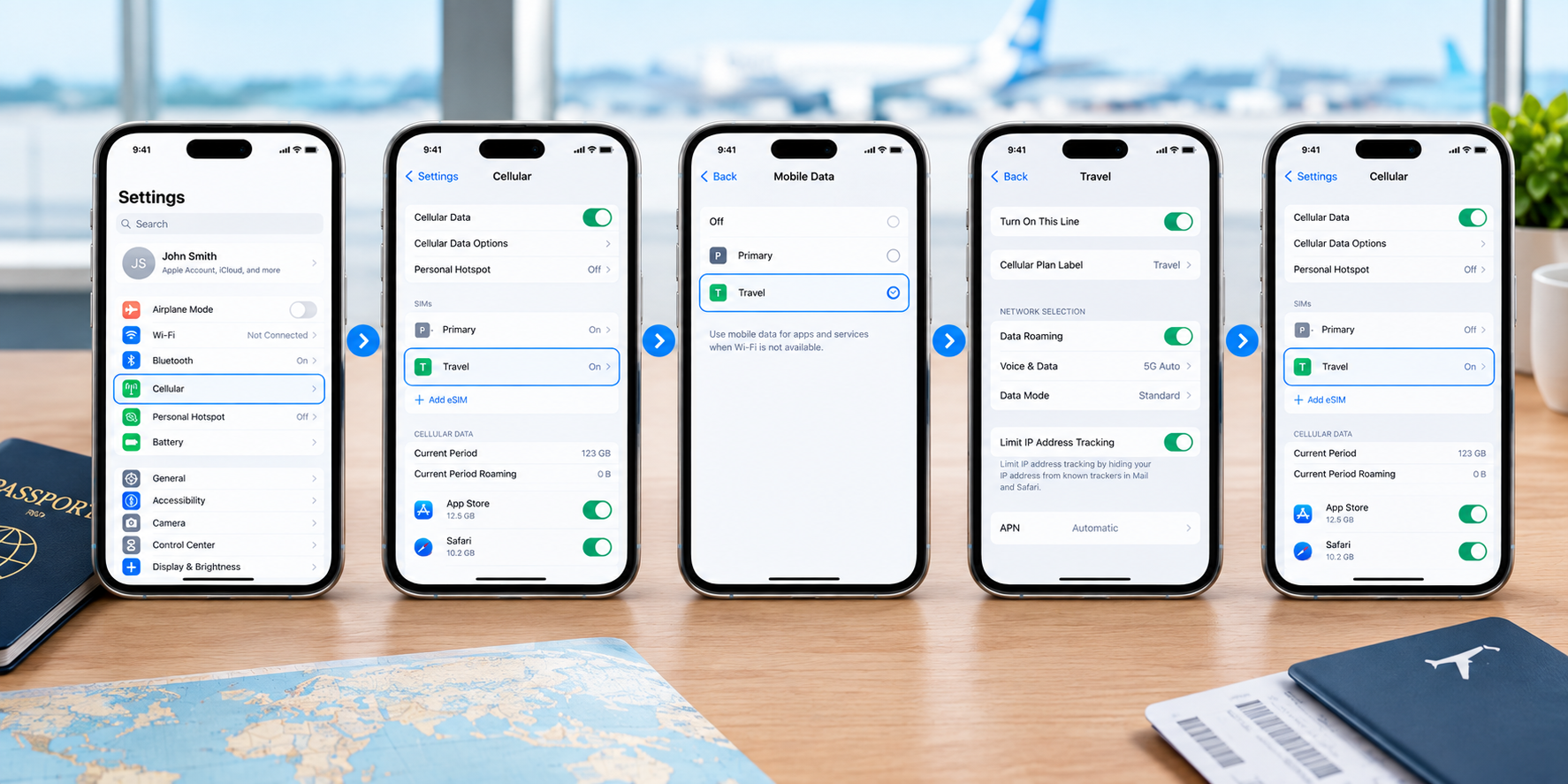
- Check your settings.
- iPhone: Settings → Cellular → Add eSIM (or Settings → General → About → look for an EID).
- Samsung: Settings → Connections → SIM manager → Add eSIM.
- Google Pixel / stock Android: Settings → Network & internet → SIMs → Add SIM/eSIM. If the eSIM option appears, your phone may support eSIM.
- Look up your model on Apple’s, Samsung’s, or Google’s official support site.
- Ask your carrier whether your specific model and plan allow eSIM.
If either the EID or the “Add eSIM” option shows up, your phone is likely eSIM-ready just check the two caveats further down before you buy.
eSIM-compatible devices (current list)
eSIM support can vary by region and carrier the *#06# check and your manufacturer’s specifications are useful ways to confirm your exact device.
Apple iPhone (many models from iPhone XS/XR onward support eSIM; some regional versions differ):
| iPhone | eSIM |
| iPhone 17, 17 Pro, 17 Pro Max, iPhone Air | ✅ |
| iPhone 16, 16 Plus, 16 Pro, 16 Pro Max, 16e | ✅ |
| iPhone 15, 15 Plus, 15 Pro, 15 Pro Max | ✅ |
| iPhone 14 series | ✅ |
| iPhone 13 series | ✅ |
| iPhone 12 series | ✅ |
| iPhone 11, 11 Pro, 11 Pro Max | ✅ |
| iPhone XS, XS Max, XR | ✅ |
| iPhone SE (2nd & 3rd gen) | ✅ |
Note: eSIM availability varies by country and region. In mainland China, only the iPhone 17e and iPhone Air currently support eSIM. In Hong Kong and Macao, certain iPhone models use Dual SIM with two physical nano-SIM cards.
Samsung Galaxy (Galaxy S20 and newer, recent foldables, and select A-series):
| Samsung | eSIM |
| Galaxy S25, S24, S23, S22, S21, S20 series | ✅ |
| Galaxy Z Flip & Z Fold (recent generations) | ✅ |
| Select Galaxy A-series, including Galaxy A54 5G | ✅ varies by model/region |
Airhub’s current compatibility list includes the Galaxy S20 through S25 series, Galaxy Z Fold and Z Flip generations, and the Galaxy A54 5G.
Google Pixel (Pixel 3 and newer with regional and carrier exceptions):
| Google Pixel | eSIM |
| Pixel 9, 8, 7, 6 series (incl. a/Pro/Fold) | ✅ |
| Pixel 5, 5a, 4, 4a, 4 XL | ✅ |
| Pixel 3, 3a | ✅ some carrier/region exceptions |
Airhub’s current compatibility list includes Pixel 3 through Pixel 9 generations and their listed variants.
Other brands (global flagship variants regional models may differ):
- Motorola — select Razr and Edge models
- Xiaomi, Oppo, Honor, Huawei — select global flagship variants
- Sony Xperia, Nokia — select models
- Microsoft Surface Duo / Surface Pro (cellular)
The catch: unlocked phones and regional variants
Two things trip people up even when their phone “has” eSIM:
- Your phone must be carrier-unlocked to use a third-party travel eSIM. A phone locked to your home network may block outside eSIMs ask your carrier to confirm it’s unlocked if you’re unsure. Airhub also states that its eSIM works only on unlocked devices.
- The same model can differ by region. iPhones purchased in mainland China, Hong Kong and Macao can have different eSIM availability; some Samsung variants also differ by region. This is exactly why checking your actual handset and its regional specifications is more reliable than relying on a generic model list.
My phone isn’t listed what now?
Not on the list? Don’t read that as a no. New models ship constantly, and no list keeps up with all of them. Run through this:
- Dial *#06# — if an EID appears, your device is likely eSIM-compatible.
- Check for the “Add eSIM” option in your settings (paths above).
- Update your software — an older OS can hide or affect available eSIM options.
- Confirm it’s unlocked and not a region-specific variant without eSIM support.
If the EID and the “Add eSIM” option are both missing after that, your specific handset likely doesn’t have eSIM support.
Once you’re compatible: setting up an eSIM
Confirmed you’re eSIM-ready? Setup takes a few minutes: buy a plan, get a QR code, and scan it under Add eSIM in your settings. We’ve got the full walkthrough in our eSIM installation guide no need to repeat it all here.
Can I use an eSIM and a physical SIM together?
Yes on most compatible phones you can run both at once. That means two numbers on one device: keep your home SIM for calls and texts, and add a local or travel eSIM for data abroad. Handy for keeping your usual number reachable (and your bank’s 2FA texts arriving) while you browse on the travel plan. Apple also confirms that compatible iPhones with a SIM tray can use a physical SIM and eSIM while traveling internationally.
FAQs
1. How do I check if my phone is eSIM compatible?
Dial *#06# — if a 32-digit EID number appears next to your IMEI, your phone is likely eSIM-compatible. You can also look for “Add eSIM” in your settings (Cellular on iPhone; SIM manager on Samsung; SIMs on Pixel). Airhub also recommends checking for the EID after dialing *#06#.
2. Which iPhones support eSIM?
iPhone XS, XS Max and XR, and later models support eSIM, although availability varies by region. US iPhones from the iPhone 14 onward are eSIM-only. In mainland China, only iPhone 17e and iPhone Air currently support eSIM, while certain Hong Kong and Macao models use two physical nano-SIMs.
3. Does my Samsung support eSIM?
Galaxy S20 and newer, the Z Flip and Z Fold foldables, and select A-series models do. Check Settings → Connections → SIM manager for an “Add eSIM” option, and note some regional variants omit it. Airhub’s current compatibility list includes the Galaxy S20–S25 series, recent Z Fold and Z Flip models, and Galaxy A54 5G.
4. Do Google Pixel phones support eSIM?
Yes. Pixel 3 and newer models are listed by Airhub as compatible, with some carrier and regional exceptions. Dial *#06# to check your specific unit.
5. My phone has eSIM but I can’t add one why?
Usually it’s carrier-locked, affected by a regional restriction, or has a software/configuration issue. Update your software, confirm it’s unlocked, and re-check your device’s eSIM compatibility. Airhub requires compatible, unlocked devices.
6. Can I use an eSIM and a physical SIM at the same time?
On most compatible phones, yes. Keep your home number on the physical SIM and use the eSIM for data both can be active at once, depending on the device and carrier configuration.
7. Does an eSIM come with a phone number?
Some plans include a number, others are data-only (common for travel eSIMs, where you keep your own number on your home SIM). It depends on the plan you choose. Airhub also offers Voice+Data plans for plans that include calling and SMS.
Leave a Reply